
|
TOP 20
|
|
SOFTWARE DOWNLOADS
|
|
|
|
|
Hardware Sensors Monitor 4.5.1.2
|
|
Publisher's description of Hardware Sensors Monitor 4.5.1.2
|
Ultimate CPU cooler and computer health monitor
|
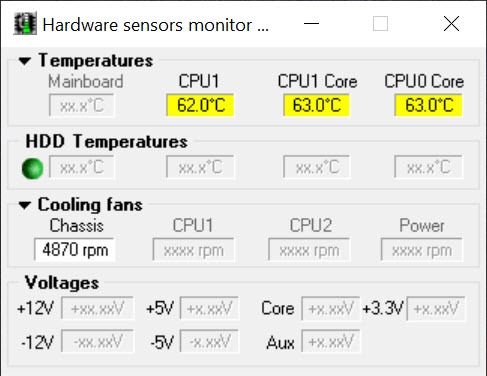
Hardware sensors monitor utilizes sensor chips on smart motherboards to track system and CPU temperatures, voltages and cooling fans. Also, program monitors most graphics cards GPU temperature and HDDs S.M.A.R.T. attributes.
By quickly catching an overheated computer, you can prevent disasters such as system instability or damage. The program is resource friendly, resides quietly in the system tray, and continually monitors the various parameters. By clicking its icon, you'll view real time values for each component.
Once it has detected an overheating state, Hmonitor can perform a number of tasks. First, it can sound an audio alarm, then shut down the system or optionally execute any selected application (i.e. sending E-mail alert messages to system administrator). It can also log information to a file on your hard drive.
From the settings dialog, Hmonitor enables you to set "yellow zone" and "red zone" temperatures for the motherboard and CPU. You can also set minimum fan RPM before a warning is issued. In addition, nominal values and thresholds can be adjusted for voltage parameters.
|
Key features for "Hardware Sensors Monitor 4.5.1.2"
• CPU Throttling - restricts CPU performance and heat production, when the CPU becomes too hot.
• nVidia/Ati GPU hardware monitoring - displays hardware monitoring data for several 3d-accelerator cards.
• HDD's S.M.A.R.T. monitoring - displays numerous attributes including the drive temperature for modern EIDE/SATA harddrives. |
Editor's review for Hardware Sensors Monitor 4.5.1.2
|
When a system goes down, the entire company pays the price, as most business activities are now centrally focused and run via computer systems. Thus, overheated computer use that results in damage to the system and system instability are two of the worst scenarios that you can ever face as a business owner or an IT administrator within a business.
However, with proper monitoring there are ways to prevent this from happening which is why the Hardware sensors monitor software, or Hmonitor as it is referred to in short, is worth checking out. The Hardware sensors monitor allows you to track the CPU core temperatures across your system as well as the input from cooling fans and voltages by reading sensor chips that are placed on smart motherboards.
As a result, if a computer or motherboard starts to overheat the Hmonitor can alert the IT team to the problem before disaster strikes. Even better, it is hardly obstructive to use of the system since it sits in the system tray unless a problem arises, then it will quietly traces the system’s temperature. Plus, at any time throughout its use you can click onto the icon and see the time values of every component that is hooked into the monitor.
In the case that a system is found to be in the process of overheating, there are a handful of tasks that the Hmonitor will automatically complete depending on the settings that you have the software on. The first is an audio alarm that alerts the administrator of the problem, followed by an automatic shut down of the system or execution of the application it believes is causing the problem. At the same time it can log information to a file located on the hard drive. As a user, it is at your discretion to denote different ‘red’ and ‘yellow’ zones for CPU and motherboard temps so that you control the program at all times.
New features in the latest version of Hmonitor:
• Windows 7/Vista x 64 signed driver supplied
• Chipsets support added for Intel P55/H55/H57/Q57/X48
• Gigabyte X58A-UD3R mainboard support verified
• Asus G60JX notebook support verified
• Mainboard support verified for Shuttle FX38
• Desktop support verified for HP Pavilion M9040
The Hmonitor offers full support for all Windows operating systems including Windows 7 and offers valuable advantages to users that purchase the Pro version including the use of AtiGPU hardware monitoring, the HDD SMART monitoring which shows all attributes of a drive, and the CPU throttling function which automatically controls heat production when a computer nears its overheating temp, making it a tool well worth investigating. |
What is new in version 4.5.1.2:
| see http://www.hmonitor.com/ |
Top popularity in System Maintenance
|
DriverMax 5.5
DriverMax is a powerful utility which helps you download, ba..
|
|
|
New added in System Maintenance
|
DirSyncPro 1.31
DirSync Pro (Directory Synchronize Pro) is a small, but powe..
|
|
|
V locity 2.0
The intensified demand for IT network efficiency and lower o..
|
|
|
|
Wise Disk Cleaner Pro 5.53
|
Scans the disks and delete junk files. Wise Disk Cleaner is a user friendly, fast and easy to use application developed to free up disk space by deleting junk files that are no longer used ..
|
|
Little Registry Cleaner 1.4.2
|
A program designed to cleanup the Windows registry. Little Registry Cleaner is an open source program that is designed to cleanup Microsoft Windows Registry. It removes obsolete or unwanted items that b..
|
|
Complete System Tuneup 2.0.0.3
|
Keep your computer in good shape. Complete System Tuneup was created to assist the average computer user in maintaining their PC. Over the past ten years or so and about four Windows O..
|
|
Advanced SystemCare 3.7.0
|
The best system utility in PC history. Advanced SystemCare Free (formerly Advanced WindowsCare Personal) has a one-click approach to helping protect, repair, clean, and optimize your PC. Wi..
|
|
Little Registry Optimizer 0.3
|
A tool that helps you to compact Windows registry. Little Registry Optimizer is a part of Little Apps` Little Registry Cleaner. This project is aimed to analyze the windows registry and (if needed) opt..
|
|
Remove Old Files 2.12
|
Automatically delete, move, archive old files. Remove Old Files is the ideal tool for deleting, moving, archiving, clearing folders of old files. Transfers data to archive folders based on file cre..
|
|
